

Relying entirely on the unpredictability of the For You Page (FYP) is a high-risk strategy for any creator or brand. While a viral hit can bring massive short-term exposure, building a sustainable, long-term audience requires a completely different approach. If you want to build a searchable library of content that brings in consistent views months after posting, mastering TikTok SEO tips for beginners is absolutely essential.
Millions of users now bypass traditional web browsers entirely. Instead, they use TikTok as their primary search engine to find product reviews, local business recommendations, and educational tutorials. By aligning your videos with the exact phrases people are typing into the search bar, you transform your account into a highly visible, evergreen resource.
This comprehensive guide breaks down exactly how the TikTok search engine analyzes content in 2026. We will provide a step-by-step framework to optimize your recording process, metadata, and user engagement metrics for maximum search visibility.
Quick Answer: How Do You Rank a Video on TikTok?
Ranking videos on TikTok requires optimizing three primary pillars of the algorithm:
Contextual Relevance: Your captions, on-screen text, hashtags, and spoken audio must perfectly match the user’s search query.
User Engagement Signals: Viewers must watch the video entirely, save it, or share it after finding it through the search bar.
Account Authority: Your profile must consistently post high-quality content focused on a specific, recognizable niche.
The Evolution of TikTok: From Viral Feed to Search Engine
The shift in consumer search behavior is undeniable. Instead of reading a lengthy blog packed with ads, users want a 60-second video demonstrating the solution directly.
TikTok recognized this behavioral shift early and heavily invested in its search infrastructure. The platform introduced features like highlighted search terms in comment sections, predictive search bars, and the robust Creator Search Insights tool.
Furthermore, content that ranks well on TikTok search frequently gets indexed and displayed in Google’s mobile search results. Google now regularly features TikTok videos in dedicated short-form video carousels. Optimizing your content for TikTok effectively doubles your traffic potential by capturing users on traditional search engines as well.
Understanding the TikTok Search Algorithm in 2026
Before you can optimize your content, you must understand how the machine learning models actually “watch” your video. TikTok’s algorithm scans the entire multimedia file to determine context, safety, and relevance.
1. Visual Object Recognition and AI
TikTok utilizes advanced computer vision to identify what is happening on the screen frame by frame. If you are a digital marketer trying to rank a video for “how to check tyre tread depth,” the AI actively looks for visual confirmation. It searches for a car tyre, a tread depth gauge or a coin, and hands performing the check.
If your video consists of you simply sitting in an office chair talking about tyres without showing one, it carries significantly less visual relevance than a hands-on demonstration. The algorithm prioritizes videos where the visual data perfectly matches the text metadata.
2. Native Audio, Voiceovers, and Voice-to-Text
The platform automatically transcribes all spoken words using highly advanced natural language processing (NLP). The algorithm understands exactly what you are saying, even if you do not manually turn on closed captions.
Your audio track is treated as highly valuable context for categorizing the video’s subject matter. Speaking clearly and ensuring your background music does not overpower your voiceover is a critical SEO requirement.
3. Text Metadata and On-Screen Elements
Metadata includes everything you manually type into the platform: the caption, the hashtags, and the text blocks you place over the video using the native editor. When all these text elements align perfectly with what the visual and audio AI detects, the algorithm gains maximum confidence in your video’s topic. This high-confidence score pushes the video to the top of the search results.
Keyword Research: Finding What Your Audience Wants
You cannot optimize a video if you do not know what your audience is actively typing into the search bar. Keyword research is the foundation of digital visibility.
Step 1: Leveraging the Native Search Bar Autocomplete
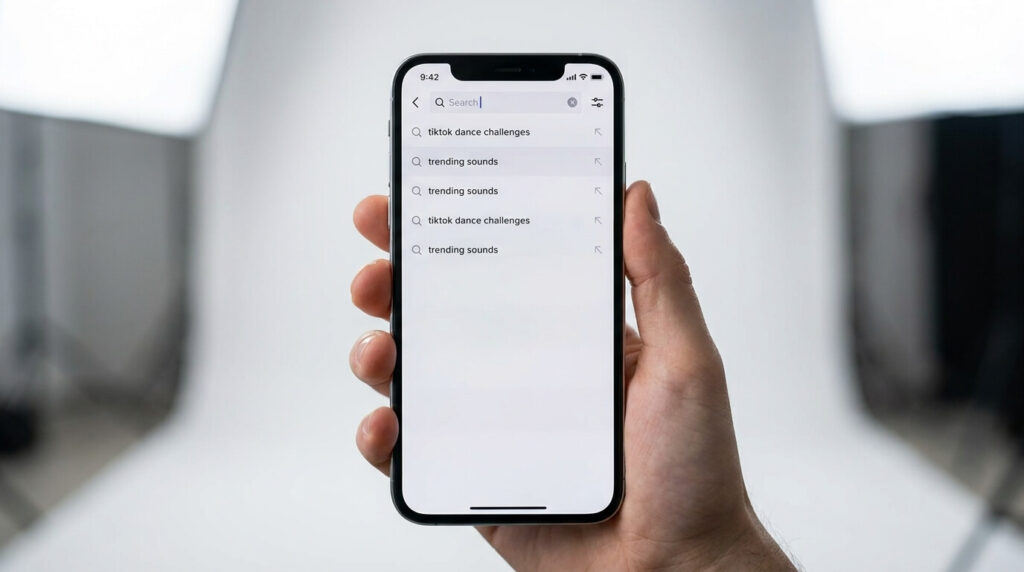
The easiest and most accurate way to find high-intent keywords is directly within the app itself. Start typing a broad term related to your niche into the TikTok search bar, but do not press enter.
The dropdown menu will instantly display a list of predictive, long-tail phrases that real users are currently searching for in high volume. For instance, if you manage marketing for an automotive garage, typing “alloy wheels” might suggest long-tail phrases like:
“best alloy wheels for BMW”
“how to clean black alloy wheels”
“alloy wheel repair cost”
These specific, longer phrases are your target keywords. They are easier to rank for than a broad term and bring in highly targeted viewers with high purchase intent.
Step 2: Utilizing Creator Search Insights
TikTok’s native Creator Search Insights is an invaluable dashboard located in your creator tools. It shows you exactly what topics are trending in your specific region and category.
More importantly, it highlights the “content gap”—topics that have high search volume from users but a low supply of videos from creators. Targeting these gaps is the fastest way to rank. Because you face significantly less competition from established creators, the algorithm is forced to push your video to the top to satisfy the user’s search demand.
In-Video Optimization: Recording and Editing Strategies
Because TikTok reads the content of the video itself, SEO must be integrated during the recording and editing phases. You cannot just slap keywords into the caption at the very end and expect to rank.
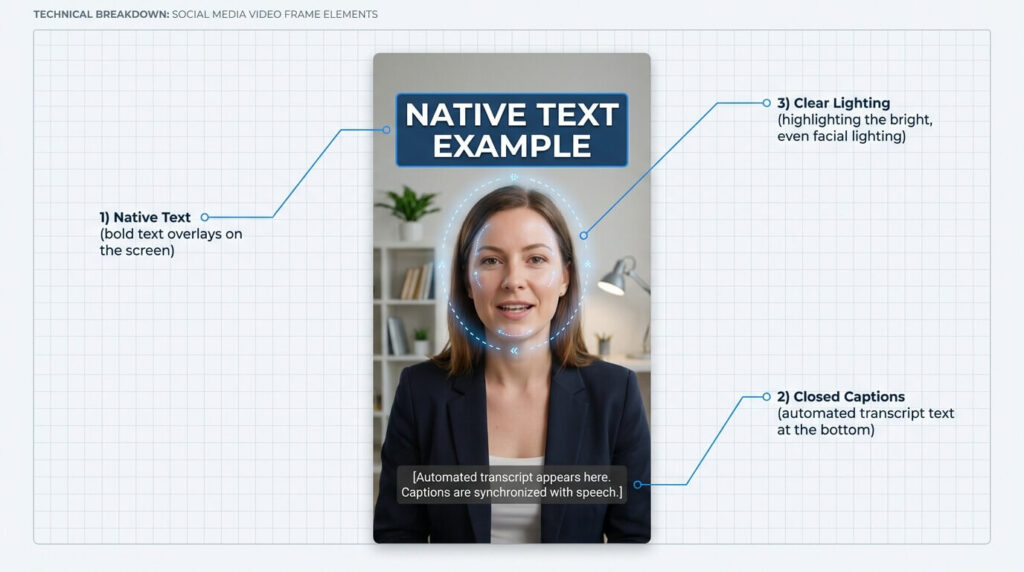
The Importance of Native On-Screen Text
Text added using third-party apps is flattened into the video file. While TikTok’s AI can still read it, text added using TikTok’s native editor provides a direct, highly readable metadata signal to the search engine.
Always place your primary keyword directly on the screen using the native text tool for the first three to five seconds of the video. If your video is about “Social Media Ad Creatives,” type those exact words in a bold, readable font right as the video starts. This confirms relevance to both the human viewer and the search algorithm instantly.
Verbally Speaking Your Target Keywords
Since the algorithm automatically transcribes your audio, you must verbally say your target keywords. Do not start your video with a generic hook like, “Hey guys, welcome back to my channel.”
Start with a highly optimized, keyword-rich hook: “If you are struggling to get clicks, here is how to design Facebook ad creatives that convert.” This ensures your target phrase is documented in the automated voice-to-text transcript right at the beginning of the video.
Enabling and Editing Auto-Captions
Always enable native closed captions. While many users watch with the sound off, captions provide a massive block of readable text for the search engine to index. Every keyword, synonym, and contextual phrase you speak is documented and used to rank your video.
Optimizing Your Captions and Metadata
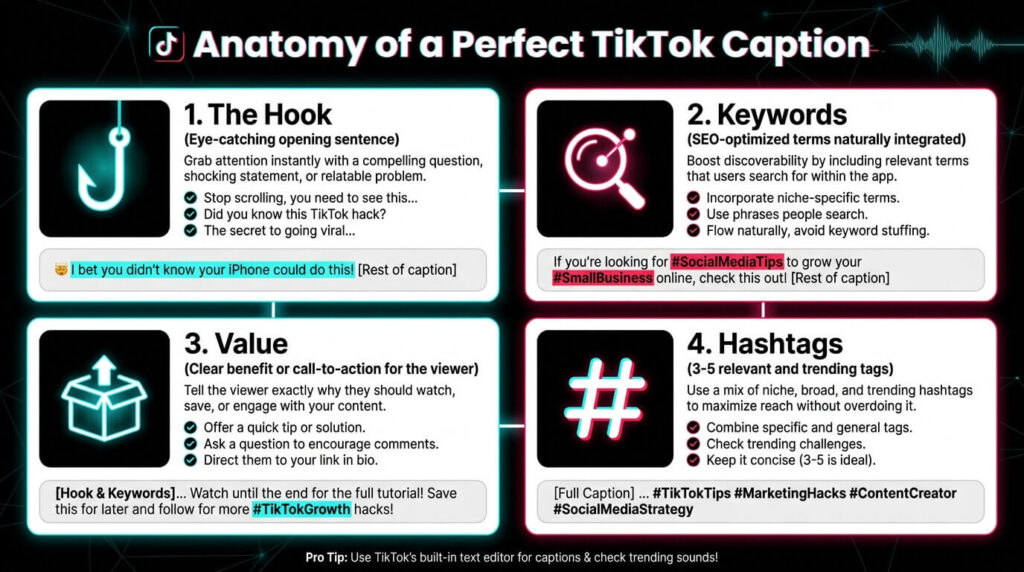
The caption space is where traditional SEO practices closely mirror TikTok SEO. You have up to 2,200 characters of space, which is enough to write a mini-blog post.
Maximizing the 2,200-Character Caption Limit
Do not leave your caption blank or use a single emoji. This is a massive waste of algorithmic real estate. Treat the caption as an opportunity to provide deep context.
Write two to three conversational paragraphs detailing exactly what the video is about. Naturally weave in your primary keyword in the very first sentence, and sprinkle in semantic variations throughout. If the video is about scheduling inventory, your caption should explain the process and mention terms like “eBay seller hub,” “inventory management,” and “relisting items.” This rich text environment heavily influences search indexing.
Building a Targeted Hashtag Cluster
The era of spamming 30 random hashtags like #FYP or #Viral is over. Today, relevance dictates reach. Generic hashtags confuse the algorithm because they do not describe the content. Use between three to six highly targeted hashtags.
1 Broad Category Tag: #DigitalMarketing
2 Niche Specific Tags: #AdCreativeTips #SocialMediaManager
1 Problem-Solving Tag: #HowToRunAds
Keep your hashtags tightly clustered around the specific search intent of the video.
User Signals That Dictate Search Rankings
Optimization gets you onto the first page of the search results, but user signals determine if you stay there. If your video ranks number one but everyone scrolls past it after two seconds, the algorithm will quickly demote it.
Watch time is the ultimate indicator of quality on TikTok. If a user searches for a tutorial, clicks your video, and watches it all the way to the end, it tells the search engine that your content perfectly satisfied their specific query. To maximize watch time, keep your intros incredibly brief. Deliver the promised value immediately and edit out all dead air.
Furthermore, “Saves” are significantly more valuable than likes for search-driven content. When a user saves a video, they signal to the algorithm that the information is highly valuable and worth revisiting. Encourage saves directly by adding a call-to-action: “Save this video for your next campaign launch.”
Common SEO Mistakes to Avoid
Even experienced creators frequently sabotage their search rankings by making a few critical errors.
| The Mistake | Why It Hurts Your SEO | The Solution |
|---|---|---|
| Keyword Stuffing | Dumping a list of keywords at the bottom of a caption looks like spam. The algorithm penalizes unnatural text structures. | Write conversational, readable sentences that naturally include your keywords in context. |
| Loud Trending Audio | Placing a loud dance track over an educational video confuses the audio-processing AI, masking your voice. | Keep trending sound volumes at 1-3% so your spoken words remain the dominant audio signal for transcription. |
| Poor Lighting | If the visual AI cannot determine what is in your video because it is dark or blurry, it struggles to index the content. | Ensure clean, well-lit visuals using natural light or a ring light to help object recognition AI. |
Conclusion: Building a Search-First Content Strategy
Transitioning to a search-first approach requires patience and discipline. Unlike viral trends that generate an immediate spike in views followed by complete silence, search-optimized videos behave like a compounding investment portfolio. A video that gets only 200 views in the first 24 hours might slowly accumulate 100,000 views over a year because it consistently ranks at the top for a specific query.
By executing these core TikTok SEO tips for beginners, you transition from chasing fleeting algorithm trends to building a reliable, searchable resource. Respect the algorithm’s need for clear metadata, accurate captions, and visual relevance. Start with thorough keyword research, optimize your on-screen text, deliver high-retention value immediately, and watch your organic traffic scale sustainably over time.
Ready to transform your content strategy? Open the app today, type your niche into the search bar, and script your next video based entirely on the top three autocomplete suggestions.
Frequently Asked Questions
Unlike traditional website SEO which can take weeks or months, TikTok indexes videos incredibly fast. A well-optimized video can begin appearing in search results within 24 to 48 hours of posting, provided the account is in good standing.
Yes. Your profile bio and display name act as overarching category signals. If your display name includes your niche and your bio clearly states what you teach, it increases your account's overall topical authority for related searches.
You must put them in both. The algorithm cross-references your spoken audio, the native text you place on the screen, and the written caption. Consistency across all three areas provides the absolute strongest ranking signal.
This usually happens due to poor user signals. If your video is optimized perfectly with keywords but viewers scroll past it immediately (resulting in low watch time), the algorithm assumes the video is clickbait or low quality and removes it from the top search results to protect the user experience.
No. Deleting and reposting is generally flagged by the system as spam behavior and can hurt your overall account authority. If a video underperforms, leave it up; it may slowly gain search traction over time as user queries shift.
