

AI Strategy • Business Growth
Agentic AI for business connects AI reasoning with tools so a system can plan and carry out a workflow within defined permissions. This guide explains how it works, where it can help marketing, sales, support and operations, and how to test one use case before committing to a wider rollout.

What Is Agentic AI?
Agentic AI is an approach in which an AI system pursues a goal, chooses next steps and uses tools to complete a task within defined limits. It can handle parts of a multi-step workflow with fewer individual prompts. The business still sets permissions, checks outputs and decides which actions require approval.
Agentic AI Explained in Business Terms
From answering a question to carrying out a workflow
A useful distinction is the job you assign. A conversational AI assistant might draft a reply when you ask. An agentic system can work toward an outcome by selecting tools and checking the results of its actions.
For example, a lead qualification agent could read an inquiry, check approved CRM fields, suggest a priority, prepare a tailored follow-up and notify a sales representative. Sending that message or changing a customer record should follow the permissions and approval rules you set.
Agentic systems combine a model, instructions and tool access; some also retain task context or memory. They can read information from one system and propose or perform an action in another. The useful question is whether that flexibility improves a specific workflow enough to justify its cost and risk.
According to Google Cloud’s overview of AI agents, agents are software systems that pursue goals and complete tasks on behalf of users. That business framing is useful because it makes the shift clear: agentic AI is not only about generating language. It is about moving work forward.
How Agentic AI Works
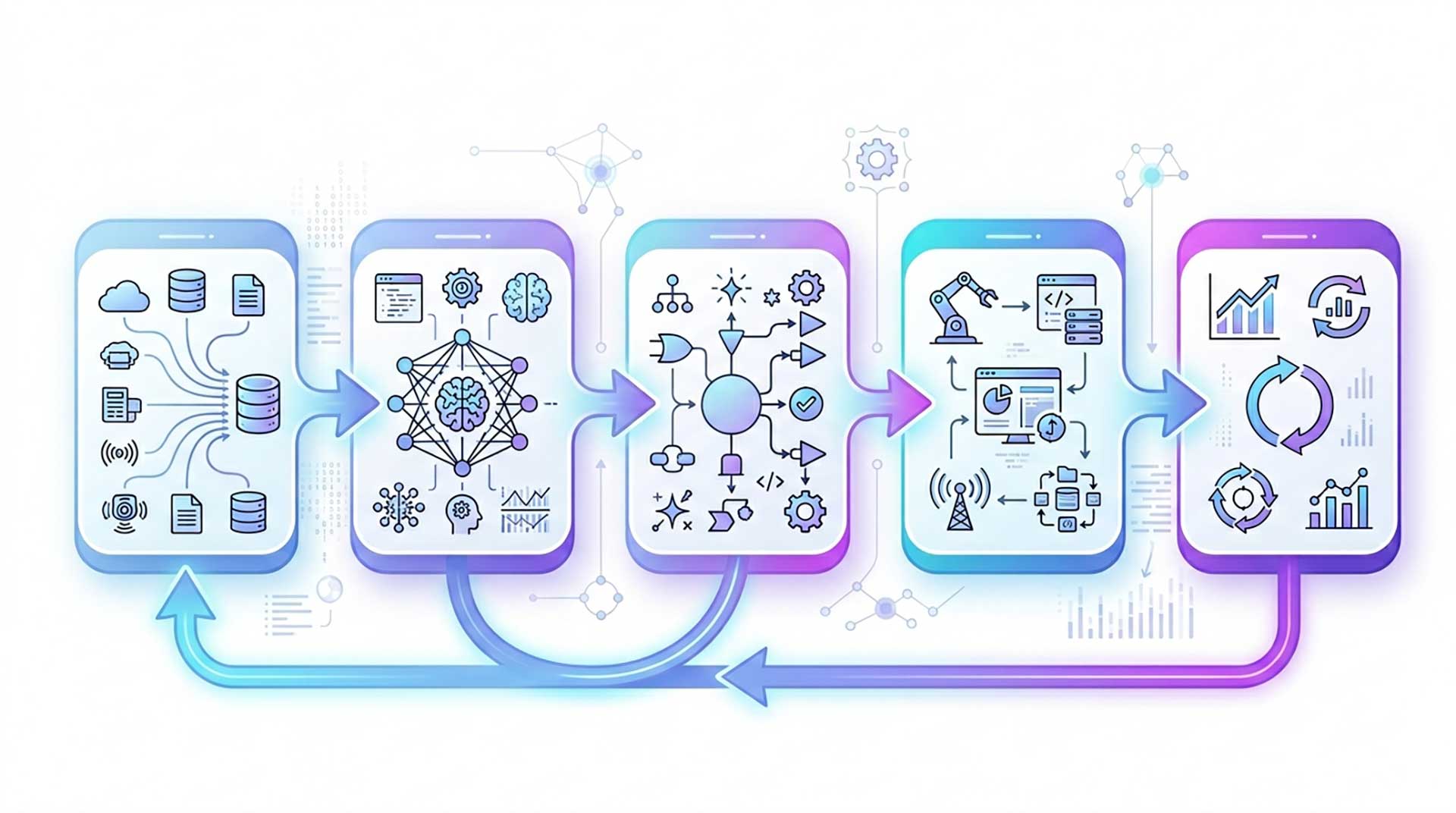
Under the hood, agentic AI can be complex. For business leaders, the simple version is enough. Most agentic systems follow a cycle like this:
- A goal is defined. The business sets an objective such as reducing response time, increasing qualified leads, or improving order accuracy.
- The agent interprets the task. It breaks the goal into smaller actions or decisions.
- It gathers context. The system pulls information from CRMs, analytics dashboards, documents, email, support tools, or internal knowledge bases.
- It selects a permitted action. Model reasoning helps choose a next step; application rules and access controls determine whether that step is allowed.
- It uses a tool. Depending on its access, it may read a record, prepare a draft, create a ticket or request approval for a change.
- It checks the result. The workflow records what happened, validates the output and either continues, stops or hands the task to a person. Feedback can improve the workflow; it does not mean every agent automatically retrains itself.
Rules-based automation follows predefined logic and can handle complex branching when it is designed for it. Agentic AI adds model-based choices about which step or tool to use next. That flexibility can help with ambiguous inputs, but it also introduces uncertainty. Use a deterministic workflow when the rules are clear, and an agent when the task needs interpretation and the results can be checked.
OpenAI’s practical guide to building AI agents emphasizes tool design, guardrails, evaluation, and orchestration. That is a strong reminder for leaders: the value does not come from the model alone. It comes from how well the agent is connected to your systems, rules, and business context.
Looking at workflow automation through a content and growth lens? Explore our guide to AI content automation.
Key Benefits of Agentic AI for Businesses
The biggest advantage of agentic AI is not that it is “smarter.” It is that it can reduce friction across real business work. When used well, it can create leverage across teams that are currently overloaded with repetitive decisions, fragmented tools, and manual handoffs.
- Faster execution: Agents can handle multi-step work that normally slows down because several tools or people are involved.
- More consistent handoffs: Validated templates and explicit checks can standardize routine work. An agent can still make mistakes, so monitor its compliance with those checks.
- Less routine administration: A useful pilot can reduce repetitive work, provided review, exceptions and maintenance do not consume the time saved.
- Quicker initial response: Monitoring and routing can shorten delays when connected systems provide timely data and the workflow is reliable.
- Scalable personalization: Agents can tailor actions using customer context, CRM data, and behavioral inputs.
- Cross-system coordination: Instead of working in one interface, agents can move between systems to keep workflows connected.
Treat these benefits as hypotheses to test. Record the existing response time, completion rate, error rate and manual effort before the pilot. Compare the agent-assisted process with that baseline using similar tasks and volumes.
Include model usage, platform fees, integration, monitoring and human review in the cost calculation. Track exceptions as well as completed tasks. Time saved becomes a business benefit when the team can use it productively; it is not automatically a cash saving.
For marketing teams in particular, agentic systems can complement the broader benefits of AI in digital marketing by reducing cycle time between insight, content, testing, and optimization.
Real-World Use Cases of Agentic AI
The following examples illustrate possible workflows, rather than results from a measured client deployment. Each requires suitable integrations, permissions and quality checks.
Marketing and content operations
A marketing agent can review search data, identify potential content gaps, prepare outlines, suggest internal links, repurpose approved assets and flag pages for review. A human editor should check the evidence, relevance and accuracy before publication.
That can help a team organize research and publishing around a clear editorial process. Our guide to AI SEO tools covers related research and optimization tools. Automated content production alone does not establish expertise or improve rankings.
Sales and lead qualification
A sales workflow can capture an inquiry, check approved customer information, suggest a routing decision, draft an initial response and alert a representative. Use only data the business is allowed to access, and keep uncertain qualification decisions available for review.
This can shorten the time between an inquiry and a response. Measure routing accuracy and qualified conversions alongside speed so that a faster process does not create lower-quality handoffs.
Customer support
A support agent can classify tickets, retrieve approved documentation, suggest a resolution and summarize the case for a person. Refunds, replacements and account changes need explicit policy checks and the required approvals; escalate uncertain or sensitive cases.
This can improve service levels while reducing the “tab switching” that burns team capacity.
Operations and back office workflows
In operations, agentic AI can reconcile documents, monitor order exceptions, coordinate approvals, chase missing inputs, update systems, and compile routine reports. These are not glamorous tasks, but they are exactly where hidden inefficiency lives.
Executive reporting and decision support
An executive reporting workflow can assemble approved data, compare KPIs against targets and flag changes for investigation. It should show the source and reporting period for each figure. Leaders need to check material conclusions before acting on them.

To improve brand visibility as AI-driven search evolves, read how to write content for AI search without sounding robotic.
Agentic AI vs Generative AI and Traditional Automation
These labels describe different capabilities and often overlap. Many agents use a generative AI model for reasoning and drafting, then call tools inside a controlled workflow. Compare the task each approach performs:
Swipe or scroll sideways to read all columns.
| Type | Primary role | How it works | Best use |
|---|---|---|---|
| Rules-based automation | Follow a defined process | Runs programmed triggers, conditions and actions | Stable, repeatable workflows with clear rules |
| Predictive or classification AI | Prediction or classification | Uses predefined models for narrow tasks | Forecasting, scoring, anomaly detection |
| Generative AI | Create content or answers | Generates text, images, code, or summaries from prompts | Drafting, ideation, summarization |
| Agentic AI | Complete goals through actions | Uses a model to choose steps and tools within permissions | Automation systems, cross-tool workflows, decision support |
Use prediction for a forecast, generative AI for a draft, rules-based automation for a known sequence, and an agent when the next step depends on interpreting context. A single business process can combine all four.
That is why the strategic conversation is shifting. Instead of only asking, “Can AI write this?” leaders are now asking, “Can AI move this workflow forward safely and profitably?”
How to Implement Agentic AI for Business: 7 Steps
Most companies should not begin with a grand transformation program. They should begin with one important workflow that is repetitive, slow, and measurable.
1. Choose one business problem with obvious friction
Look for processes with high repetition, too many handoffs, or delayed response times. Examples include lead qualification, reporting, ticket triage, renewal follow-up, or content production.
2. Define the outcome before the technology
Set a business KPI first. That could be response time, cost per lead, average resolution time, campaign turnaround, or conversion rate. Without a clear success metric, agentic AI becomes a demo instead of an investment.
3. Map the workflow and decision points
Document the process as it works today. Where does data come from? What decisions happen? Which steps require human approval? Which actions can be automated safely? This step prevents expensive confusion later.
4. Connect the right systems and data
Agents are only as useful as the context they can access. That means CRM data, support history, analytics, internal documents, and business rules must be reachable, current, and well governed.
5. Add guardrails and human approval where needed
Define tool permissions, approval thresholds, data access and an audit trail. Treat instructions found in customer messages, documents or websites as untrusted input, not as permission to change the agent’s rules. Test prompt injection attempts, incorrect tool calls and missing data. Make it possible to stop the agent and route the task to a person.
6. Pilot narrowly and measure outcomes
Start with one workflow and a small user group. Test representative cases, including exceptions, before enabling changes to business systems. Compare completion rate, accuracy, response time, total cost and human review effort with the existing process. Define acceptable failure rates and a rollback path before rollout.
7. Scale only after the first workflow proves value
Once the business case is real, expand horizontally into similar processes or vertically into more complex workflow stages. That is how agentic adoption becomes strategic instead of scattered.
Illustrative pilot • Lead qualification
A practical pilot brief
- Input: Inquiries from your existing form and the CRM fields approved for this workflow.
- Allowed actions: Suggest a priority, prepare a response and create a review task.
- Approval boundary: A representative approves customer messages, record changes and any uncertain qualification decision.
- Success measures: Time to first reviewed response, routing accuracy, qualified conversions, review time and cost per completed inquiry.
- Stop conditions: Unsupported claims in a draft, unauthorized data access, repeated errors or failure to meet the agreed quality threshold.
Calculate value using your own numbers
Net monthly value = usable value of time saved + attributable additional gross profit − platform, model, integration and review costs. Keep conversion assumptions conservative and avoid counting the same gain twice.
For a hypothetical time-only example, 100 tasks saving six minutes each release ten hours. At a planning value of $20 per hour, that is $200 of capacity. If all recurring costs are $150, the estimated net capacity value is $50. This is an illustration, not a promised return or a client result; initial setup costs must also be recovered.
Teams working on content and growth can strengthen early implementation by pairing workflow automation with a disciplined publishing model, internal linking, and search intent mapping. That is where guides like our content marketing strategy framework can complement AI execution.
Need help deciding which workflow to test? Discuss the process, data and success measures with Digital Mind Metrics.
Talk to Digital Mind MetricsTools and Platforms to Know
You do not need to master the full vendor landscape, but leaders should know the main categories. The right platform usually depends on your current stack, governance needs, and how much customization you want.
- OpenAI Agents SDK: A developer toolkit for agent workflows with tools, handoffs, guardrails and tracing. Budget for engineering and evaluation as well as model usage.
- Google Cloud Gemini platform: Google Cloud’s platform for building, deploying and governing agents connected to enterprise data. Check the current product documentation when planning an integration.
- Microsoft Copilot Studio: A tool for creating agents and connecting them with business systems. Review available connectors, licensing and tenant controls for your workflow.
- Agents for Amazon Bedrock: An AWS service for model-driven tasks using action groups and connected knowledge. Assess permissions, evaluation and operating costs.
- Salesforce Agentforce: Salesforce’s platform for agents in customer and business workflows. Assess the data, integrations and permissions required by your use case.
These are different kinds of tools, rather than an interchangeable shortlist or a ranking. Compare connector coverage, data handling, permission controls, evaluation tools, total cost and access to human support before choosing. Product names and capabilities can change.
Common Mistakes and Risks to Avoid
An agentic workflow needs an operating plan as well as a working demo. Watch for these common rollout problems:
Starting with technology instead of the process
Leaders sometimes begin by asking which platform to buy. The better question is which workflow deserves automation first.
Giving the agent too much freedom too early
Keep customer messages, spending, financial decisions and sensitive record changes behind the appropriate permission and approval controls. A prompt telling an agent to be careful is not a substitute for enforcing access limits in the application.
Ignoring data quality
Bad data turns a fast system into a fast mistake machine. Agents need reliable context, current documentation, and clear business rules.
No clear owner
Agentic workflows often sit across departments. Without a named owner, no one fixes prompts, permissions, metrics, or exceptions.
Measuring the wrong thing
Time saved is helpful, but it is not enough. Leaders should track outcomes such as qualified pipeline, error reduction, customer satisfaction, or conversion lift.
Assuming AI replaces change management
Even great systems fail when teams do not trust them. Adoption depends on training, communication, and visible governance.

What Business Leaders Should Watch Next
Vendor capabilities are changing quickly. Instead of assuming every new feature will create value, use the following questions to assess improvements against your workflow and operating constraints:
When evaluating the next version of a tool, check:
- Integration quality: Can the agent use the specific systems and data the task requires, with reliable error handling?
- Action control: Can you separate reading, drafting and executing, and enforce approval rules for each?
- Monitoring and ownership: Can an accountable person inspect decisions, tool calls, errors and costs?
- Business outcomes: Does an improvement change completion quality, service levels or attributable profit rather than just increasing activity?
- Orchestration complexity: Does adding another agent solve a demonstrated limitation, or would one controlled workflow remain easier to test and maintain?
OpenAI’s practical guide recommends starting with simple agent designs, evaluating their behavior and using human intervention when required. More autonomy or more agents are not automatically better; expand only when you can demonstrate an improvement for the task.
For marketing teams, maintain an accurate knowledge base and a clear editorial review process. Useful content should answer the audience’s questions, support factual claims and show its sources. Google’s guidance for generative AI search continues to emphasize useful content and established SEO practices; an agentic workflow itself is not a shortcut to search visibility.
Frequently Asked Questions About Agentic AI for Business
What is agentic AI in simple terms?
Agentic AI uses a model and tools to work toward a goal within defined limits. It can select steps, check results and continue a workflow, but it still needs permissions, quality checks and a path to human review.
How is agentic AI different from generative AI?
Generative AI produces outputs such as text, images or summaries. Agentic AI uses a model to choose steps and tools in a workflow. Many agentic systems use generative AI, so the two categories overlap.
Can small businesses use agentic AI?
Yes. A small business can pilot a narrow task such as inquiry triage, draft preparation or reporting if the data, integrations and operating costs are suitable. Begin with one measurable process and keep approval for important changes.
What are the risks of agentic AI?
Risks include inaccurate outputs, prompt injection, data leakage, unauthorized actions and unexpected costs. Limit access, validate results, monitor tool calls, require approval for sensitive actions and define stop conditions. These controls reduce risk but do not eliminate it.
What tools are used to build agentic AI systems?
Examples include the OpenAI Agents SDK, Google Cloud Gemini platform, Microsoft Copilot Studio, Agents for Amazon Bedrock and Salesforce Agentforce. They serve different development and business needs; compare current capabilities, connectors, costs and controls for your use case.
Where should a business start with agentic AI?
Choose a repetitive workflow with outcomes you can check. Establish a baseline, define permitted actions, assign an owner, test representative cases and compare quality, cost and review effort before expanding.
Your Next Step: Choose One Workflow and Test It
Agentic AI can connect AI reasoning with actions across a business workflow. Its value depends on the process, the available data, the quality of its outputs and the controls around each action. A useful system makes work easier to complete and easier to check.
Choose one workflow where slow handoffs or repetitive administration create a measurable problem. Set a baseline, define approvals and test the result before extending the system to more teams.
Digital Mind Metrics works with businesses on SEO, content strategy, automation and lead generation. Use a strategy discussion to identify the workflow and the evidence needed to assess a pilot.
Plan a practical agentic AI pilot
Discuss your workflow, data and success measures with Digital Mind Metrics.
