
Google Search Console SEO Guide
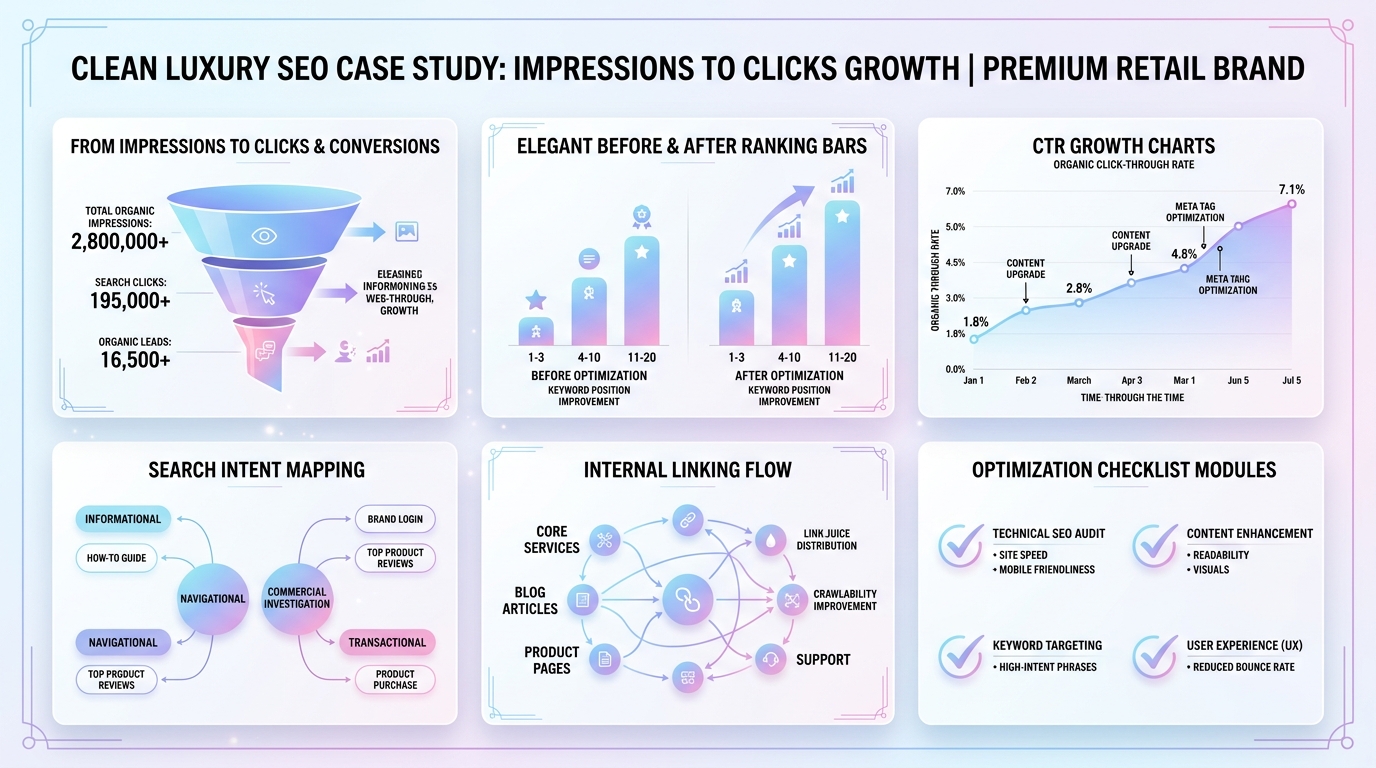
Google impressions into clicks is the SEO problem many website owners face after Google starts showing their pages but traffic stays flat. The good news is that impressions mean your content is visible. The challenge is turning that visibility into rankings, clicks, and leads.
If your Search Console report shows thousands of impressions but only a few clicks, your site is not necessarily failing. Google may already understand your pages. However, your rankings may be too low, your titles may not earn attention, or your content may not fully match what searchers want.
This guide shows you how to diagnose the real issue, prioritize the right pages, improve rankings, write better snippets, and convert existing search visibility into measurable organic traffic.
Quick Answer: How Do You Turn Google Impressions Into Clicks?
To turn Google impressions into clicks, start in Google Search Console. Find pages with high impressions and low clicks, check their average position, then decide whether the page has a ranking problem, CTR problem, or search intent problem. Improve rankings first for pages below position 30. Improve titles, meta descriptions, schema, and snippets for pages already ranking near page one.
- High impressions + position 40 or lower: improve content quality, intent match, topical depth, and internal links.
- High impressions + position 10 to 30: update the page, strengthen headings, add FAQs, and build internal links.
- High impressions + position 1 to 10 + low CTR: rewrite title tags, meta descriptions, and snippet-focused sections.
- High impressions + wrong queries: adjust the page angle or create a better page for that intent.
What Do Google Impressions Mean?
A Google impression means your website appeared in search results for a query. It does not always mean the user clearly saw your result, and it does not mean they clicked. It simply means your page was eligible and shown within the search experience.
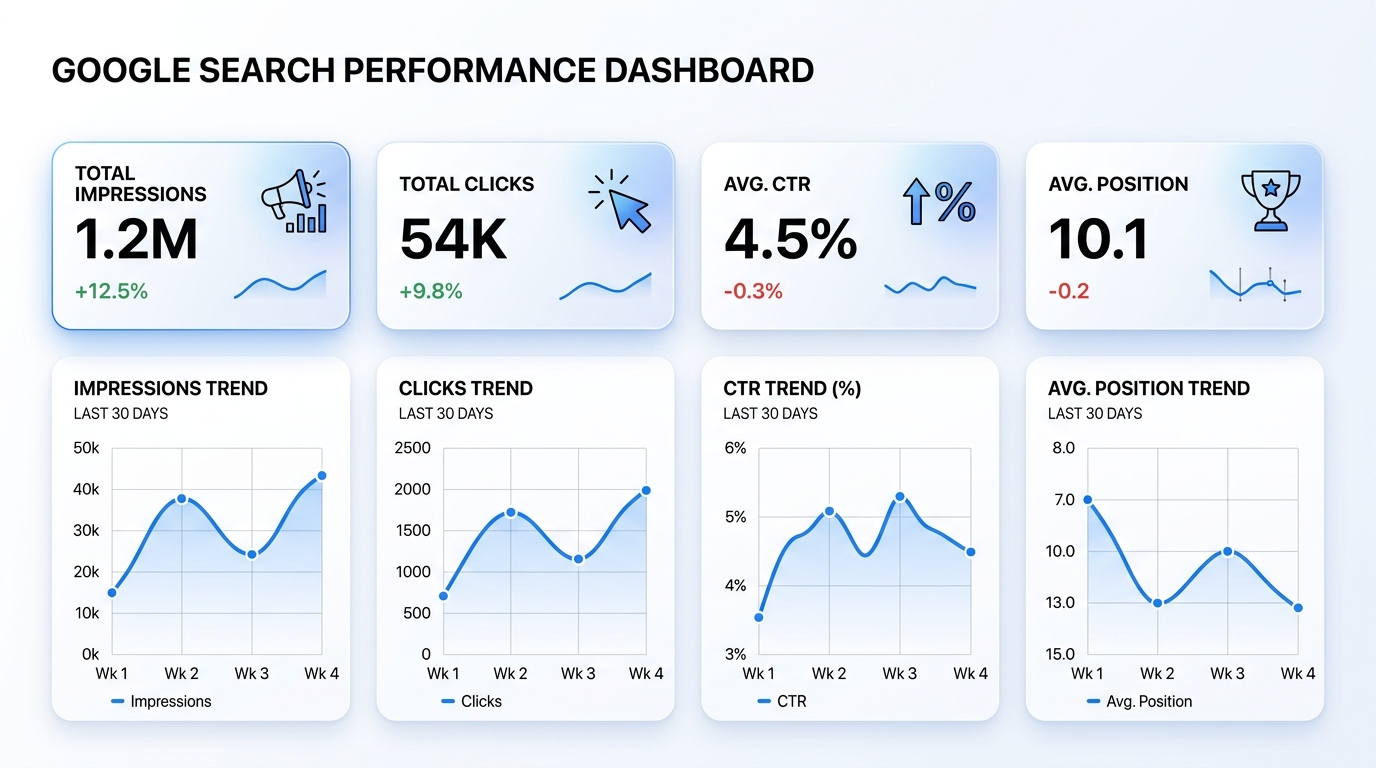
In Google Search Console, impressions help you understand visibility. Clicks show traffic. CTR shows the percentage of impressions that became clicks. Average position shows roughly where your page appeared in results.
These four metrics work together. Looking at one number alone can lead to bad decisions. For example, low CTR looks alarming, but if the average position is 55, the real problem is ranking, not the title.
Google explains Search Console performance data in its official documentation, including clicks, impressions, CTR, and position. You can review the Google Search Console Performance report to understand how these metrics are calculated.
Why You Get Impressions But No Clicks
Impressions without clicks usually come from one of five issues. The most common is low ranking position. A page can get impressions from positions 30, 50, or 80, but almost no one scrolls far enough to click it.
Another common issue is weak search result copy. Your title may be accurate but boring. Your meta description may be too vague. Or Google may be pulling a snippet from your page that does not match the query well.
The third issue is search intent mismatch. Your page may mention the keyword, but it may not provide the format the user wants. A query looking for a checklist needs a checklist. A query looking for tools needs a comparison. A query looking for a local service needs a service page.
Main Reasons Impressions Do Not Become Clicks
- Your page ranks too low to earn meaningful clicks.
- Your SEO title is generic or not benefit-driven.
- Your meta description does not match the query.
- Your content does not satisfy search intent.
- Your page competes with stronger domains.
- Your content is too thin, outdated, or generic.
- Multiple pages on your site compete for the same query.
- SERP features push organic results lower on the page.
How to Diagnose the Real Problem in Google Search Console
Before editing pages, diagnose the issue properly. Google Search Console gives you enough data to separate ranking problems from CTR problems.
Go to Performance, then Search results. Set your date range to the last 3 months. Export your pages and queries. Then sort by impressions. This shows which pages Google is already testing or showing most often.
How to Turn Google Impressions Into Clicks Using GSC Data
The fastest way to turn Google impressions into clicks is to prioritize pages that already have visibility. These pages do not need to be discovered from zero. They need to be improved, clarified, and supported.
| GSC Pattern | Likely Problem | Best Fix |
|---|---|---|
| High impressions, average position 40+ | Ranking and authority problem | Improve content depth, internal links, search intent, and topical support. |
| High impressions, average position 10–30 | Near-opportunity page | Refresh content, add FAQs, improve headings, and build internal links. |
| High impressions, position 1–10, low CTR | Snippet and title problem | Rewrite title, meta description, intro, and structured summary sections. |
| High impressions for unrelated queries | Intent mismatch | Re-angle the page or create a separate page for that query intent. |
| Multiple pages show for one query | Keyword cannibalization | Choose one main page, merge overlap, and link supporting pages clearly. |
This step prevents wasted work. If a page ranks at position 52, changing the meta description alone will not create meaningful traffic. You need to improve the page enough to move it closer to page one.
Step 1: Prioritize Pages With Real Click Potential
Not every page deserves immediate attention. Some pages may have low impressions because the topic has little demand. Others may rank for irrelevant queries. Your best opportunities are pages that Google already shows for relevant terms.
Start by exporting your top pages by impressions. Then place them into three buckets.
Priority Bucket A: Positions 1 to 10
These pages are already close to the top. If clicks are low, focus on improving CTR. Update titles, meta descriptions, intro paragraphs, schema, and rich snippet opportunities.
Priority Bucket B: Positions 11 to 30
These pages are your fastest ranking opportunities. They may need stronger content, better internal links, more complete answers, or improved topical coverage. A good update can sometimes move them closer to page one.
Priority Bucket C: Positions 31 to 60
These pages need deeper improvement. They are visible, but not competitive. Focus on search intent, content depth, internal links, examples, backlinks, and content uniqueness.
Step 2: Improve Rankings Before You Chase CTR
CTR optimization matters most when your page is visible enough for users to choose it. If the page is buried on page four or five, your first job is to improve rankings.
Ranking improvement usually comes from stronger relevance, clearer search intent match, better topical coverage, stronger internal links, technical health, and authority.
Ranking Fixes for Pages With Impressions But Low Position
- Review the queries sending impressions.
- Identify the dominant search intent.
- Compare your page with top-ranking pages.
- Add missing subtopics, examples, tables, and FAQs.
- Improve the introduction so it answers the query quickly.
- Add internal links from related posts and category pages.
- Update outdated sections and remove generic filler.
- Submit the updated page for indexing.
Google’s SEO Starter Guide explains that site structure, helpful content, and clear page organization help search engines understand your website. Review the Google SEO Starter Guide when improving your site foundations.
Step 3: Rewrite SEO Titles for More Clicks
Once a page reaches a realistic ranking range, title optimization becomes powerful. Your title is often the first thing users compare in the search results. A generic title can lose clicks even when the page ranks well.
Good SEO titles are specific, relevant, and benefit-led. They include the main query naturally and give users a reason to choose your page over the others.
Title Formulas That Improve Google CTR
- Problem + solution: Impressions But No Clicks? 9 SEO Fixes That Work
- Keyword + outcome: Turn Google Impressions Into Clicks and Leads
- Audience + benefit: SEO CTR Guide for Small Business Websites
- Number + practical value: 11 Ways to Improve Google CTR With GSC Data
- Before/after angle: From Impressions to Clicks: A Search Console Fix Plan
| Weak Title | Better Title | Why It Works |
|---|---|---|
| SEO Tips for Beginners | Impressions But No Clicks? 9 SEO Fixes for Beginners | Names the problem and promises practical fixes. |
| Google Search Console Guide | How to Use GSC to Turn Impressions Into Clicks | Connects the tool to a clear outcome. |
| Improve Website Traffic | How to Increase Organic Clicks From Existing Impressions | Targets a specific SEO scenario. |
Google’s documentation on title links explains that clear, descriptive titles help users understand search results. You can review Google’s title link guidance before editing important pages.
Step 4: Write Meta Descriptions That Match Search Intent
Meta descriptions do not directly guarantee rankings, but they can influence whether users understand and choose your result. They should summarize the page clearly and match the user’s intent.
A strong meta description usually includes the problem, the solution, and the outcome. It should not be stuffed with keywords. It should read like a useful preview.
Meta Description Formula
Use this simple structure:
Formula: Learn how to [solve problem] by [method]. Includes [useful asset, checklist, examples, or workflow] for [audience/outcome].
Examples of Strong Meta Descriptions
- Learn how to turn Google impressions into clicks by improving rankings, titles, search intent, internal links, and page quality.
- Getting impressions but no clicks? Use this GSC checklist to diagnose ranking, CTR, and intent problems on your SEO pages.
- Improve organic clicks from existing impressions with title rewrites, better content, internal links, FAQs, and Search Console analysis.
Google may use your meta description or choose page content as the snippet. Therefore, your on-page intro, headings, and summary blocks should also be written clearly. Google’s snippet documentation explains how snippets are generated.
Step 5: Match Content to Search Intent
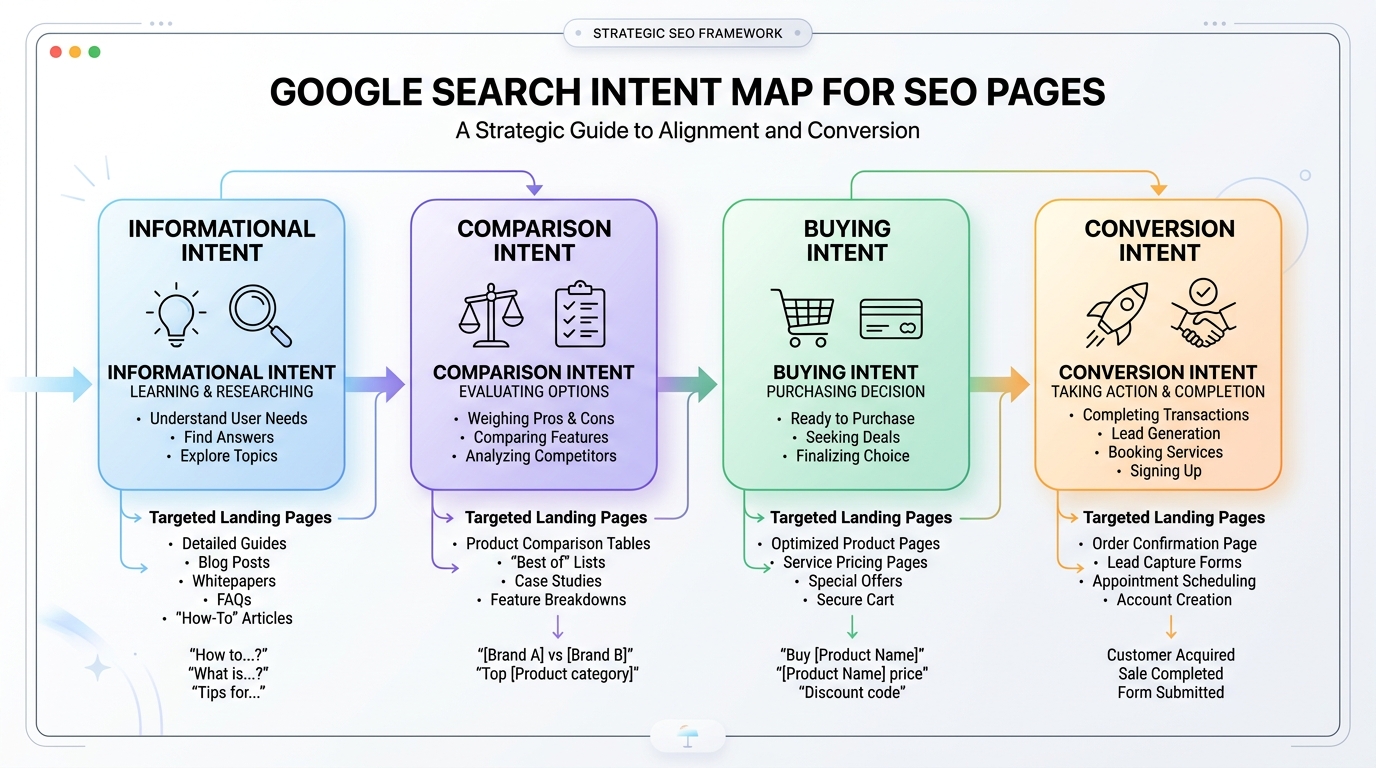
Search intent is the reason behind a query. If your page does not match intent, it may get impressions but fail to rank high or earn clicks.
For example, a user searching “best SEO tools for small business” expects a comparison. If your page only explains what SEO tools are, it may feel incomplete. A user searching “how to improve CTR in GSC” expects steps, not a general SEO overview.
Search Intent Types to Check
| Intent Type | User Wants | Best Page Format |
|---|---|---|
| Informational | Definition or explanation | Guide, glossary, beginner article |
| Practical | Steps to solve a problem | Tutorial, checklist, workflow |
| Commercial | Compare options | Best tools list, comparison page |
| Local | Nearby provider | Service page, location page, GBP-supported content |
| Transactional | Take action now | Landing page, booking page, product page |
If your page ranks for queries with different intent, you may need to split the content into separate pages. Trying to satisfy every intent on one URL can make the page unfocused.
Step 6: Add Sections That Improve Dwell Time
Dwell time is influenced by whether users find the page useful. While SEO tools may discuss engagement differently, the practical takeaway is simple: users stay longer when content answers their question clearly and gives them the next helpful step.
If your page feels thin, vague, or hard to scan, users may leave quickly. Better structure improves readability and makes the page more useful.
Content Elements That Keep Readers Engaged
- Quick answer boxes near the top
- Comparison tables
- Step-by-step workflows
- Examples based on real scenarios
- Common mistakes sections
- FAQ sections from actual queries
- Internal links to deeper resources
- Clear CTAs that match reader intent
For example, if a page gets impressions for “how to improve Google CTR,” add a section that shows exactly how to diagnose CTR by position. If it gets impressions for “impressions but no clicks,” add a troubleshooting table.
Step 7: Strengthen Internal Links
Internal links help search engines understand which pages matter and how topics connect. They also help users discover related content. For pages with impressions but weak rankings, internal links can be one of the fastest improvements.
Start by choosing your priority page. Then find related pages on your website that can naturally link to it. Use descriptive anchor text that explains the destination.
Internal Linking Examples
- Link from a Google Search Console guide using anchor text like “improve Google Search Console impressions.”
- Link from an AI SEO guide using anchor text like “turn impressions into organic clicks.”
- Link from a content optimization post using anchor text like “improve SEO click-through rate.”
- Link from a technical SEO checklist using anchor text like “diagnose impressions but no clicks.”
For related strategy ideas, visit Digital Mind Metrics SEO resources and build a focused cluster around search visibility, content optimization, and conversion-focused SEO.
Step 8: Fix Keyword Cannibalization
Keyword cannibalization happens when multiple pages on your site compete for the same query. This can confuse search engines and split ranking signals.
In Search Console, click a query, then switch to the Pages tab. If several URLs appear for the same query, review whether they serve different intents. If they do not, choose one main page.
How to Fix Cannibalization
- Identify the strongest URL for the query.
- Merge useful content from weaker pages into the main page.
- Redirect or deoptimize overlapping pages where appropriate.
- Update internal links to point to the main URL.
- Clarify headings and titles so each page has a distinct purpose.
For small sites, cannibalization often happens when several blog posts target similar broad topics. A better approach is to build one strong pillar page and several supporting articles with unique angles.
Step 9: Use Schema to Support Search Result Clarity
Schema markup helps search engines understand the structure and meaning of your page. It does not guarantee higher rankings, but it supports clarity. For pages designed to turn impressions into clicks, schema can help reinforce page type, FAQs, breadcrumbs, and article details.
Useful Schema Types
- Article schema: identifies article details, author, publisher, and topic.
- FAQ schema: supports visible question-and-answer sections.
- Breadcrumb schema: clarifies site structure.
- HowTo schema: useful for step-by-step instructional content when appropriate.
- LocalBusiness schema: useful for local service pages.
Make sure your schema matches visible page content. Do not mark up content that users cannot see. Also, test structured data before publishing major updates.
30-Day Roadmap to Turn Impressions Into Clicks
This roadmap helps you move from analysis to action without randomly changing pages.
Week 1: Export and Prioritize
- Export pages and queries from Google Search Console.
- Sort pages by impressions.
- Add average position, CTR, and clicks to your review.
- Choose 5 to 10 pages with the best opportunity.
- Separate ranking problems from CTR problems.
Week 2: Improve Content and Intent Match
- Review the top queries for each page.
- Update the intro to answer the query faster.
- Add missing sections, examples, tables, and FAQs.
- Remove fluff and outdated content.
- Improve internal links to the page.
Week 3: Improve Titles, Snippets, and Schema
- Rewrite titles for pages ranking near positions 1 to 20.
- Write query-matched meta descriptions.
- Add FAQ or Article schema where relevant.
- Improve headings for clarity and scanability.
- Submit updated URLs for indexing.
Week 4: Measure and Refine
- Check impressions, clicks, CTR, and average position.
- Compare results against your update dates.
- Give updates enough time before judging.
- Double down on pages moving upward.
- Rework pages with no improvement after enough data.
Need Help Finding Your Best SEO Opportunities?
A focused SEO audit can show which pages need ranking improvement, CTR optimization, content updates, or internal links.
Example: Diagnosing Impressions With Almost No Clicks
Imagine a blog post has 5,000 impressions, 6 clicks, a 0.1% CTR, and an average position of 48. Many website owners would immediately rewrite the title. But the bigger issue is position.
At position 48, the page is not visible enough to earn meaningful traffic. The page needs a ranking improvement plan before a CTR test.
The Diagnosis
Search Console shows the page appears for several related queries, but the content is too general. The page mentions the topic, but it lacks examples, a quick answer section, detailed steps, and internal links.
The Fix
- Rewrite the introduction to answer the main query immediately.
- Add a table that separates ranking problems from CTR problems.
- Add FAQs based on actual Search Console queries.
- Add internal links from related pages.
- Update the title only after the page moves closer to page one.
The Lesson
Turning impressions into clicks is not one tactic. It is a sequence. Diagnose first, improve rankings where needed, then optimize CTR when users are actually seeing your result.
Common Mistakes to Avoid
Many site owners lose time because they optimize the wrong thing. Avoid these mistakes when working with Search Console data.
Mistake 1: Treating Every Low CTR Page the Same
Low CTR at position 3 is very different from low CTR at position 53. The first needs snippet improvement. The second needs ranking improvement.
Mistake 2: Rewriting Titles Too Often
Constant title changes can make it harder to understand what worked. Make a change, note the date, and track results over time.
Mistake 3: Ignoring Search Intent
A page can include the keyword but still fail the intent. Always check what users expect from the query.
Mistake 4: Publishing More Instead of Improving Existing Pages
If Google already shows your pages, improve those first. New content can help, but existing impressions are often faster opportunities.
Mistake 5: Forgetting Conversion
Clicks are not the final goal. Make sure priority pages guide readers toward a next step, such as a guide, audit, consultation, or signup.
Expert Insights for Better Search Result Optimization
Search result optimization is not about tricks. It is about alignment. The query, title, snippet, page content, and user expectation should all point in the same direction.
Use Query Language in Headings
If users search “impressions but no clicks,” consider using that phrase naturally in a heading. This helps the page feel relevant immediately.
Add a Short Answer Before the Details
Many users want the answer first. A concise answer block near the top can improve readability and may help with featured snippet-style visibility.
Make Each Page More Specific
Broad pages struggle because they compete with everyone. Specific pages often perform better because they match narrower intent.
Build Supporting Content Around the Main Page
If this page is your main guide, supporting articles could cover title tag optimization, Search Console analysis, SEO content refreshes, internal linking, and CTR testing.
Track Updates With Dates
Keep a simple log of what changed and when. This helps you understand whether a ranking or click improvement came from a title rewrite, content update, or internal link push.
FAQ About Turning Google Impressions Into Clicks
Why do I get Google impressions but no clicks?
You may get impressions but no clicks because your page ranks too low, your title is not compelling, your meta description does not match the query, the page does not fully satisfy search intent, or competitors have stronger authority and snippets.
How do I turn Google impressions into clicks?
Analyze pages in Google Search Console, prioritize pages with high impressions, improve rankings first, rewrite titles and meta descriptions, match search intent, add useful sections, strengthen internal links, and track results over time.
What is a good CTR in Google Search Console?
A good CTR depends on ranking position, query intent, brand awareness, SERP features, and competition. Pages ranking in positions 1 to 3 usually earn much higher CTR than pages ranking below page one.
Should I optimize CTR or rankings first?
If your average position is below 30, focus on improving rankings first. If your page ranks between positions 1 and 10 but CTR is low, focus on rewriting titles, improving meta descriptions, matching snippets to intent, and strengthening rich result opportunities.
How long does it take to improve clicks from impressions?
SEO improvements can take days, weeks, or months depending on crawl frequency, competition, content quality, internal links, and authority. Review performance after 14, 28, and 60 days instead of judging updates immediately.
Can meta descriptions increase clicks?
Meta descriptions can help clicks when they clearly match the query and explain the value of the page. However, Google may rewrite snippets, so your on-page content should also include clear summaries and relevant answer sections.
Why did impressions increase but clicks stay flat?
This often means Google is testing your page across more queries, but the page is not ranking high enough or is not compelling enough to earn clicks. Check average position before changing titles.
Conclusion: Turn Visibility Into Organic Growth
Learning how to turn Google impressions into clicks starts with understanding what the data is really saying. Impressions mean Google is showing your page. Clicks mean users are choosing it. The gap between the two tells you where to improve.
If your average position is low, improve rankings first. Make the content more useful, better structured, more specific, and better connected with internal links. If the page already ranks well but CTR is weak, rewrite the title, improve the meta description, and make the snippet match search intent.
The best SEO strategy is not always publishing more. Often, it is improving what Google already sees. Start with your highest-impression pages, diagnose the real issue, make focused updates, and measure the results carefully.
That is how impressions become clicks, clicks become visitors, and visitors become leads.
Ready to Turn Your Search Visibility Into Leads?
If your website is getting impressions but not enough clicks, traffic, or conversions, the next step is a focused SEO opportunity audit. You need to know which pages to update, which titles to rewrite, which content gaps to close, and which internal links to strengthen.
Digital Mind Metrics helps businesses turn search data into practical SEO actions that improve rankings, increase organic clicks, and support measurable growth.
